




















eCommerce website development is not just about picking a theme and uploading products. It involves dozens of moving parts across design, functionality, security, content, and performance. Miss one critical step and you risk slow load speeds, abandoned carts, payment failures, or worse, a launch that no one ever finds.
This checklist covers everything that needs to be in place before a store goes live in 2026. Whether this is a first store or a complete rebuild, use this as the definitive pre-launch guide.
Key Takeaways
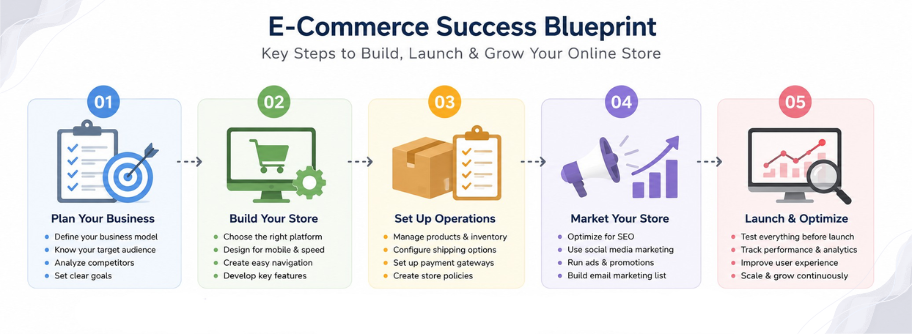
- ecommerce website development in 2026 demands planning across design, technical infrastructure, content, and performance before a single product goes live.
- The ecommerce business model must be defined before platform selection, as it shapes every other decision in the development process.
- Strong ecommerce website designing is conversion architecture, not just aesthetics. Mobile-first design, fast load times, and clear product pages directly affect revenue.
- Understand the full ecommerce website cost including platform fees, integrations, content, and 12 months of operational costs, not just the initial build figure.
- The technical website development checklist, covering Core Web Vitals, SSL, schema markup, and structured redirects, must be completed before launch, not after.
- Content readiness is as important as technical readiness. Every product page, policy page, and meta description should be written before going live.
- Checkout optimization is where revenue is won or lost. Guest checkout, multiple payment options, and abandoned cart recovery are non-negotiable in 2026.
- Analytics and full pre-launch testing are the final gatekeepers before go-live. A store that launches without tracking has no roadmap for growth.
Why eCommerce Website Development Planning Matters More in 2026
The online retail landscape has shifted dramatically. Consumers expect faster load times, smoother mobile experiences, and more personalized journeys than ever before. Search engines have raised the bar on what it takes to rank. Payment processors demand higher security standards. And with more competition entering every niche daily, a half-finished store is a liability, not an asset.A well-planned ecommerce website development process saves time, money, and reputation. It also directly affects the ecommerce website cost down the line. Fixing problems after launch always costs more than preventing them before it.
Getting this right from day one is not optional anymore. It is competitive necessity.
Reality Check: Why 70% of eCommerce Stores Fail After Launch
This number gets thrown around a lot, but the reasons behind it rarely get discussed honestly.
Most online stores do not fail because the product is bad. They fail because the ecommerce website development process was rushed, underfunded, or built on assumptions instead of research. Here is what the data and real-world patterns consistently show:
| Failure Reason | What It Actually Means |
| Poor mobile experience | Over 70% of online shopping happens on mobile. A desktop-first build loses customers before they even see the product. |
| Slow load speed | A one-second delay in page load time can reduce conversions by up to 7%. Most budget builds never test this. |
| No SEO foundation | Launching without technical SEO means the store is invisible to search engines from day one. |
| Checkout friction | Stores with complicated or broken checkouts lose customers at the last possible moment. |
| Wrong platform choice | Choosing a platform that does not fit the ecommerce business model leads to costly rebuilds within 12 to 18 months. |
| Underestimated costs | Businesses that only budget for the build and not ongoing ecommerce website cost run out of runway before gaining traction. |
The stores that survive past 12 months are almost always the ones that treated ecommerce website development as a strategic project, not a quick setup task.
Step 1: Define the eCommerce Business Model Before Development Begins
Before a single line of code is written or a single template is chosen, the ecommerce business model needs to be clearly defined. This single decision shapes everything else: the platform, the payment setup, the shipping logic, the content strategy, and the overall ecommerce website designing direction.Common eCommerce Business Models to Define Early
| Business Model | Key Characteristics | Platform Considerations |
| B2C (Business to Consumer) | Direct sales to end customers | Shopify, WooCommerce, BigCommerce |
| B2B (Business to Business) | Bulk orders, invoicing, net terms | Magento, custom builds |
| D2C (Direct to Consumer) | Brand-owned, no middlemen | Shopify Plus, custom stacks |
| Dropshipping | No inventory held | Shopify with supplier integrations |
| Subscription-based | Recurring billing | Recharge, custom subscription tools |
| Marketplace | Multiple vendors, commission model | Custom development or platform add-ons |
Getting the ecommerce business model wrong at the start leads to expensive re platforming later. Nail this first.

Step 2: Choose the Right Platform for eCommerce Website Development
Platform selection is one of the most consequential decisions in the entire ecommerce website development process. The right platform depends on the business model, technical resources, expected order volume, and long-term growth plan.Platform Selection Checklist
- Does the platform support the required ecommerce business model (B2C, B2B, subscription, etc.)?
- Is there a clear path to scale without a full rebuild?
- Does it support third-party integrations for email, CRM, analytics, and fulfillment?
- What are the ongoing platform fees, transaction fees, and add-on costs?
- Is the hosting managed or self-hosted, and how does that affect performance?
- Does the platform have a strong developer community for ongoing website development support?
Step 3: Plan the eCommerce Website Designing Phase Carefully
Ecommerce website designing is not decoration. It is conversion architecture. Every color choice, button placement, font selection, and page layout influences whether a visitor becomes a customer.Design Checklist for eCommerce Website Development
Brand and Visual Identity- Logo finalized and available in all required formats
- Brand color palette and typography defined
- Style guide created before design work begins
- Clear site navigation with logical product category structure
- Breadcrumbs enabled for easy backtracking
- Search functionality prominent and working correctly
- Consistent header and footer across all pages
- High-resolution product images from multiple angles
- Zoom functionality for product images
- Clear product titles, descriptions, and specifications
- Visible pricing with any discount logic applied correctly
- Stock availability displayed in real time
- Customer reviews and ratings section included
- All pages designed for mobile before desktop (not the reverse)
- Touch-friendly buttons with appropriate sizing
- No horizontal scrolling on any mobile screen size
- Fast-loading image formats used throughout (WebP preferred)
Step 4: Website Development Technical Checklist
The technical foundation of the store is what search engines crawl, what payment processors communicate with, and what customers experience during every interaction.Core Technical Requirements
Performance and Speed- Target Core Web Vitals scores: LCP under 2.5 seconds, CLS under 0.1, INP under 200ms
- Image compression and next-gen formats applied sitewide
- Lazy loading enabled for below-the-fold content
- Browser caching configured correctly
- CDN (Content Delivery Network) connected for fast global delivery
- SSL certificate active and verified across all pages
- HTTPS enforced with proper redirects from HTTP
- PCI DSS compliance confirmed with payment processor
- Two-factor authentication enabled on admin accounts
- Regular automated backups scheduled
- XML sitemap generated and submitted to Google Search Console
- Robots.txt file configured correctly
- Canonical tags applied to prevent duplicate content issues
- Structured data (schema markup) added for products, reviews, and breadcrumbs
- 301 redirects in place for any old URLs
Step 5: eCommerce Website Cost Planning and Budget Allocation
Understanding the full ecommerce website cost before launch prevents nasty surprises and helps prioritize where investment goes first.Typical eCommerce Website Cost Breakdown by Category
| Cost Category | What It Includes | Priority Level |
| Platform fees | Monthly or annual subscription | Critical |
| Domain and hosting | Custom domain, managed hosting | Critical |
| Design and development | Custom build or theme customization | Critical |
| Payment gateway fees | Per-transaction and monthly fees | Critical |
| Apps and integrations | Email, reviews, upsells, shipping tools | High |
| Content creation | Product photography, copywriting | High |
| SEO setup | Technical SEO, keyword strategy | High |
| Marketing tools | Email platform, analytics, ads | Medium |
| Ongoing maintenance | Updates, security patches, support | Medium |
The true ecommerce website cost is always more than the initial build. Budgeting for 12 months of operational costs, not just launch costs, is the smarter approach.
Step 6: Product and Content Readiness Checklist
A store with great design and flawless code still fails if the content is not ready. Content readiness is one of the most overlooked parts of ecommerce website development.Content Checklist Before Launch
Product Catalog- All products uploaded with correct SKUs, prices, and variants
- Product descriptions written for both customers and search engines
- Primary keywords incorporated naturally into product titles and descriptions
- Meta titles and meta descriptions written for every product page
- About Us page with genuine brand story
- Contact page with multiple contact methods
- Shipping and delivery policy clearly written
- Returns and refunds policy written and legally reviewed
- Privacy policy in place (required by law in most regions)
- Terms and conditions page live
- At least three to five published posts before launch
- Content targeting informational keywords relevant to the niche
- Internal linking strategy connecting blog content to product pages
Step 7: Payment, Shipping, and Checkout Optimization
The checkout flow is where revenue is made or lost. Every unnecessary step, confusing form field, or missing payment option is a potential exit point.Checkout and Payment Checklist
- Multiple payment options available (credit/debit cards, digital wallets, buy now pay later)
- Guest checkout enabled alongside account creation option
- Checkout progress indicator visible to customers
- Auto-fill enabled for address and payment fields
- Order confirmation emails tested and sending correctly
- Failed payment recovery emails set up
- Abandoned cart email sequence configured
Shipping Configuration Checklist
- All shipping zones set up correctly
- Real-time carrier rates or flat-rate options configured
- Free shipping threshold set and visible throughout the store
- Estimated delivery times displayed on product and cart pages
- Tracking notification emails automated post-purchase
Step 8: Analytics, Tracking, and Testing Before Go-Live
Launching without tracking is like driving with no dashboard. There is no way to know what is working, what is not, or where customers are dropping off.Analytics and Testing Checklist
Tracking Setup- Google Analytics 4 installed and verified
- Google Search Console connected
- Meta Pixel (if running social ads) installed correctly
- Heatmap tool connected (Hotjar or Microsoft Clarity)
- Conversion tracking events configured for add to cart, checkout start, and purchase
- Full test purchase completed end-to-end in staging environment
- All payment methods tested with test card numbers
- Mobile testing completed on at least three different screen sizes
- All forms tested (contact, newsletter, checkout)
- All links checked for 404 errors
- Load speed tested with Google PageSpeed Insights
- Cross-browser testing completed (Chrome, Safari, Firefox, Edge)
Ready to Launch the Right Way
Every successful online store started with a plan. eCommerce website development done right means fewer fires to put out after launch, lower long-term ecommerce website cost, and a customer experience that builds trust from the very first visit. The checklist above is not just a formality, it is the difference between a store that struggles in its first few months and one that gains traction from day one. Strong ecommerce website designing, a clearly defined ecommerce business model, and a technically sound website development foundation are what separate stores that grow from stores that stall. Take the time, check every box, and launch with confidence.Frequently Asked Questions
What does a complete ecommerce website development project include?
Platform setup, ecommerce website designing, payment integration, SEO technical foundations, security, and pre-launch testing. The scope shifts based on the ecommerce business model, whether B2C, B2B, dropshipping, or subscription.
How long does ecommerce website development take?
A theme-based build takes two to four weeks. A fully custom ecommerce website development project with complex ecommerce website designing and integrations typically runs two to four months. Content delays are the most common cause of going over schedule.
What affects ecommerce website cost the most?
Custom ecommerce website designing, platform choice, number of products, and integrations are the biggest cost drivers. The true ecommerce website cost also includes 12 months of platform fees, apps, hosting, and maintenance, not just the initial build.
Which ecommerce business model works best in 2026?
It depends on resources and goals. B2C suits brand-led stores, dropshipping reduces inventory risk, subscriptions build recurring revenue, and B2B fits bulk-order operations. Defining the ecommerce business model before website development begins prevents expensive platform changes later.
What are the biggest ecommerce website development mistakes in 2026?
Launching without mobile optimization, skipping Core Web Vitals, choosing the wrong platform for the ecommerce business model, underestimating ecommerce website cost, and going live without a full test purchase. Poor ecommerce website designing that ignores usability is equally costly.